Getting started
A new plan has a checklist at the bottom right of the plan screen (along the bottom on a phone), reading “Getting started” and how many of its seven items are done. It opens when the tour ends, or after starting again. Each item opens what it is about, and ticks itself once you have looked. After quick setup, every card it made, the surplus rules and the milestones start ticked:
- Name yourself and check your age, in Household. Saving Household ticks it, or a name.
- Check each account, income and expense, including when it ends: each card is ticked off as you open it, and the item opens the next.
- Look at where spare money goes: the surplus rules.
- Look at how retirement is paid for: the drawdown order.
- Add or check your milestones.
- Track your progress (optional, Plus): your net worth, month by month, recorded by itself as you change the plan.
- Try a what-if (optional, Plus).
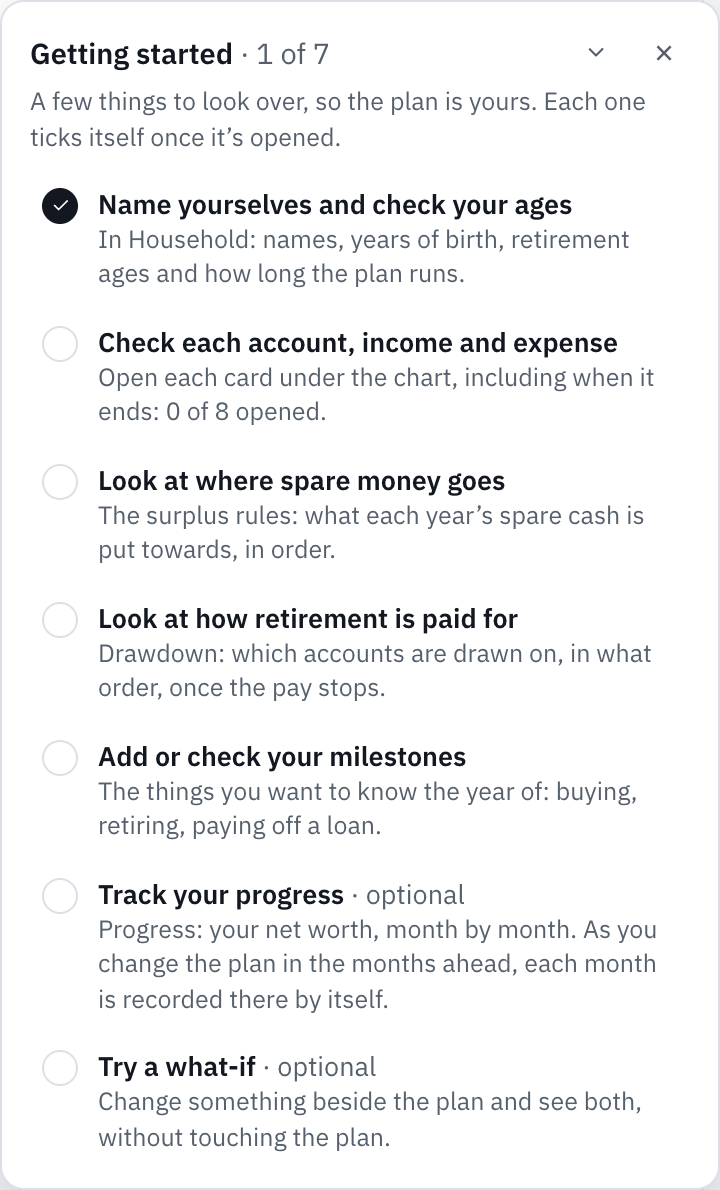
On the free plan the two Plus items show a padlock and open a preview of the feature instead. Seeing the Progress preview ticks it; the what-if stays open until you try one.
The checklist hides during the tour, in what-if mode and in a plan someone shared with you. The × puts it away with its ticks kept, and they follow your account to another device. Bring it back from Help at the top of the app, then Open Getting started, or from the same link on the account page.
Still stuck?
Signed in? Choose Help at the top of the app, pick what it’s about and tell us what happened; it reaches us with the page you were on, and you get a copy. Otherwise write to [email protected]. We reply by email. Please don’t send passwords or account numbers.